

Vibration Monitoring with MQTT Sparkplug B:
Best Practices for Topic Namespaces (2025 Guide)
Find out the best ways to use Sparkplug B topic namespace for vibration monitoring. Quality of Service, retained/LWT, security, and historian integration.
Introduction
You already know why vibration monitoring is important if you’ve ever had a motor fail on a holiday weekend. It’s not usually the bearing that hurts; it’s the bill for the time it takes to fix it. I’ve seen plants lose tens of thousands of dollars over the years because a simple sensor didn’t send an early warning. That’s when MQTT Sparkplug B comes in.
This guide tells you how Sparkplug B organizes vibration data, why topic namespaces are important, and what to do about quality of service, retained messages, and security. I’ll keep it simple: no business jargon, no tech talk, just what works in real life.
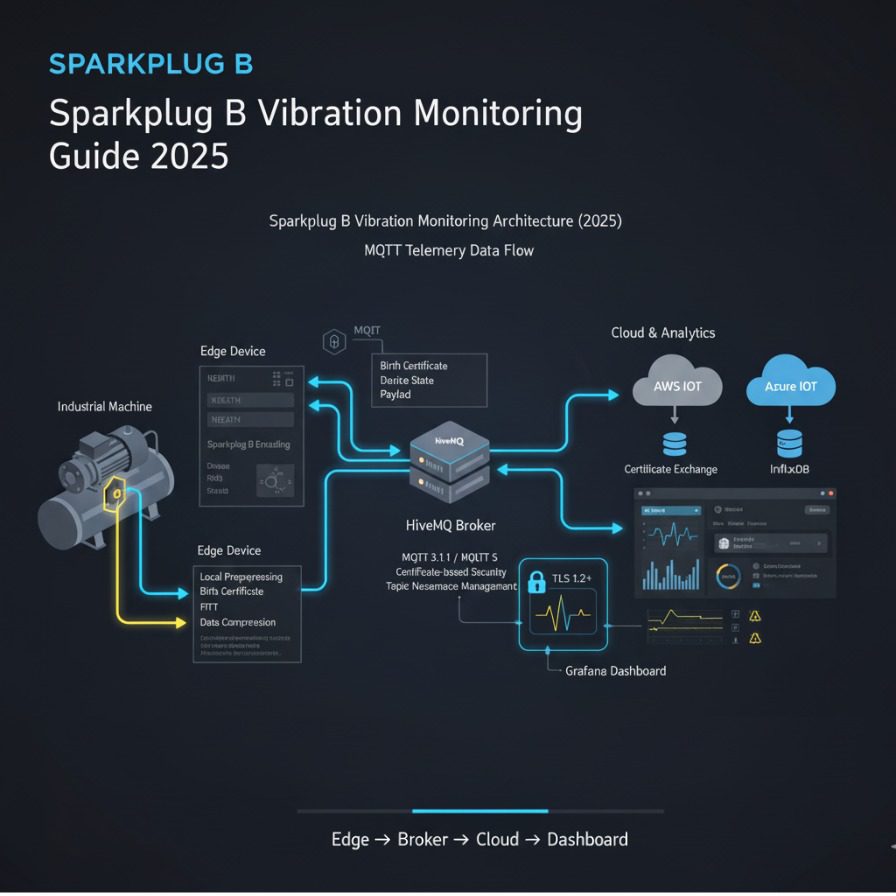
- Sparkplug B adds structure and device state to MQTT.
- Use NBIRTH/NDEATH + LWT for true uptime visibility.
- Choose QoS 0/1 correctly; retain NBIRTH and STATE.
- Secure brokers with TLS 1.2+ and yearly cert rotation.
- Pick a historian that fits your plant size and cost plan.
Why use Sparkplug B to check for vibrations?
Let’s not make it too hard. Sparkplug B is a set of rules that builds on MQTT to give your industrial messages structure, context, and state awareness.
Traditional MQTT is fine for simple communication, but in a plant with a lot of sensors and gateways, data can get messy. You might see random names, missing context, or not know if a device is alive or dead. Sparkplug B solves this problem by setting rules for how data should look and act.
A real‑life example: A client of mine in Ohio put vibration sensors on 30 pumps. When a gateway restarted, old MQTT topics stayed around. The operators thought the pumps were still working when they weren’t. When they switched to Sparkplug B, the system automatically marked devices as “dead” and sent event notifications to maintenance. There was a 12 % drop in downtime.
Monitoring the condition and planning for maintenance
Monitoring vibrations is the most important part of predictive maintenance. You can tell when a bearing is about to break by keeping an eye on patterns like RMS velocity and kurtosis. Data streams continuously through MQTT to your historian or dashboard instead of coming in monthly rounds with a handheld meter.
What is a normal return on investment? About $4 000–6 000 USD per motor per year, taking into account fewer breakdowns and fewer manual checks. That’s a lot of money.
Basics of Sparkplug B for Reliability
The truth is that every Sparkplug B network depends on NBIRTH, DBIRTH, and NDEATH messages. These tell a node or device when to turn on or off.
Quality of Service and Keep Settings
| Setting | Use Case | Why it matters |
|---|---|---|
| Quality of Service 0 | Fast, temporary metrics (waveform samples) | Least overhead |
| Quality of Service 1 | KPIs and alarms | Guarantees delivery once |
| Quality of Service 2 | Used only for important commands | Ensures single delivery |
| Messages that were kept | NBIRTH and STATE topics | Show current device state to new subscribers |
Keep the “Last Will” (LWT) option turned on. It lets everyone know when a node goes down without warning. Think of it as an automatic death notice for your edge devices.
Handling of Birth, Death, State, and Offline
When a sensor (device) connects, it sends out a DBIRTH signal. If the broker can’t get in touch, it automatically sends a DDEATH. The same goes for nodes with NBIRTH/NDEATH.
This heartbeat system is what makes IIoT data reliable. You don’t have to guess if a sensor froze; the broker takes care of it. Store‑and‑forward and retained messages keep monitoring strong, even in dusty plant corners with weak Wi‑Fi.
Best Practices for Topic Namespaces
Okay, let’s talk about naming, which is the part people forget until things go wrong. The right topic structure makes your data easy to read and scale.
spB/<group_id>/<msg_type>/<edge_node_id>/<device_id>
group_id is the name of your plant, msg_type means NBIRTH, DDATA, NDATA, and so on. edge_node_id is your gateway name; device_id is the actual sensor (bearing_1, pump_03). Use short lowercase names with underscores, no spaces.
Good vs Bad Namespaces
| Example | Good/Bad | Why |
|---|---|---|
| spB/PlantA/DDATA/node01/pump3_bearing1 | ✓ | Clear hierarchy |
| spB/Plant‑A‑Pump#03‑sensor | ❌ | Hyphens and unclear meaning |
| spB/MainPlant/DATA/p01sen | ❌ | Missing message type |
| spB/PlantB/DDATA/line2/vib_sensor_07 | ✓ | Readable by software |
Naming Metrics for Vibration
Don’t use metric names in your property fields; use units instead.
Good: accel_rms_g, temp_c, vel_rms_mms.
Bad: accelerationRMS (missing unit).
Use SI units like m/s², mm/s, and °C. Your analytics team will be grateful later.
Sample Fields for Payload
| Field | Example Value | Description |
|---|---|---|
| Value | 0.325 | RMS acceleration |
| Name | accel_rms_g | Instant reading |
| Time | 1731012002 | Unix epoch |
| Quality | Good | Quality flag |
| Unit | g | Unit of measurement |
Edge Architecture and MQTT Brokers
A stable broker setup is the basis for every vibration project.
Sensor → Edge Gateway → MQTT Broker → Tools for History and Analysis.
Broker Choices and Grouping
| Broker | License | Scalability | Notes |
|---|---|---|---|
| Mosquitto | Open Source | Moderate | Perfect for pilots |
| HiveMQ | Commercial | High | Best for enterprise load |
| EMQX | Free and commercial | High | Supports clustering |
| AWS IoT Core | Cloud pay‑as‑you‑go | High | Good for distributed plants |
Enable broker clustering if uptime is important (and it usually is). That means if one server fails, clients reconnect to another. Keep identical topics across brokers for smooth failover.
Sparkplug’s Security and Governance
Most pilots have issues with security. A misstep could expose valuable data. Here’s the minimum you need:
- TLS Encryption (port 8883 for secure MQTT)
- X.509 client certificates
- mTLS (mutual authentication for client/server)
- RBAC (role‑based access control) for users
- Regular certificate rotation before expiration
- Allowlist (IP‑range controls)
Certificates and Rotation
Think of certs as plant badges. Each device needs its own. Rotate them at least once a year. Never store private keys in plain text on gateways.
A Simple Broker Hardening Checklist
| Task | Complete? |
|---|---|
| Allow TLS 1.2+ and check certificates | ☐ |
| Use strong passwords or token authentication | ☐ |
| Limit anonymous connections | ☐ |
| Rotate certificates automatically | ☐ |
| Log and check failed logins | ☐ |
Integration of Historian and Analytics
You can collect millions of vibration points per day, but raw data alone won’t pay the bills. You need a historian that does something useful with it.
Table of Differences: PI vs Canary vs Open Source
| Platform | License | MQTT/ Sparkplug Ready | Cost (USD/yr) | Best Use |
|---|---|---|---|---|
| OSIsoft PI System | Commercial plugin required | Yes | 50 000 + | Large companies |
| Canary Historian | Commercial (native) | Yes | 20 000–25 000 | Medium to large sites |
| InfluxDB/ Timescale | Open Source | Custom integration | 0–5 000 | Development / testing |
Canary often hits the sweet spot — it connects to Sparkplug B natively and compresses data efficiently. PI rules the corporate realm. Smaller teams can pair Influx or Timescale with Grafana for charts.
Dashboards and Alerts
Grafana lets operations understand vibration trends clearly. Typical layout includes:
- RMS vibration trend
- Velocity vs time scatter
- Temperature overlay
- Alarm thresholds in red zones
Implementation Walkthrough (POC)
Here’s the path most U.S. factories take when starting a Sparkplug B project.
- Install wireless accelerometers or vibration sensors on motors and fans.
- Collect readings through Ethernet/IP or Modbus TCP via the Edge Gateway.
- Use an MQTT client to convert data to Sparkplug B format.
- Forward to a Mosquitto or HiveMQ broker instance.
- Store data in Influx or Canary historian.
- Visualize with Grafana dashboards.
Sample Node‑RED flow: Inputs (vibration sensor) → Function Node (Sparkplug encoding) → MQTT Out Node → Canary Connector.
Testing and Checking
- Watch QoS acknowledgments and retained flags.
- Use packet capture (Wireshark) to ensure TLS payload encryption.
- Verify NBIRTH/NDEATH state messages during power cycles.
Tuning for Performance and Cost
You need to balance sample speed vs network load. A 10 kHz sensor can overload your broker. Use delta metrics so only new values send when vibration crosses a threshold.
Quick formula:
Bandwidth = sample_rate × sample_size × number of devices × overhead
To save money, lower sample rate or compress payloads — most sites save 30–40 % of bandwidth that way.
Optional Tool: Calculator for the Cost of Downtime
Downtime Cost Calculator
Readers can type how many hours of downtime they’ve cut and see approximate annual savings instantly.
Examples from the Real World
- Texas food plant saved about $18 000 by catching a bearing failure early on when 22 motors were being watched.
- Wisconsin brewery used Sparkplug B to connect to its existing SCADA system, cutting field maintenance trips by 25 %.
- Edge gateways in a Michigan auto plant publish over 100 metrics per robot with broker uptime of 99.98 %.
- Municipal water utility switched from Modbus polling to Sparkplug B, reducing network traffic by 40 %.
- Oregon sawmill deployed an open‑source stack (Mosquitto + Influx + Grafana) with zero license
cost and full visibility.
FAQ
Summary
It doesn’t have to be hard to keep an eye on vibrations. With MQTT Sparkplug B you get consistent topic names, automatic device state, and reliable data without extra configuration. Done right, you cut
downtime, spot issues early, and stretch maintenance budgets.
If you have an automation team in the U.S., start a pilot on one production line. You’ll see within weeks
how clean data and clear namespaces make analytics dependable and weekends less stressful.
