

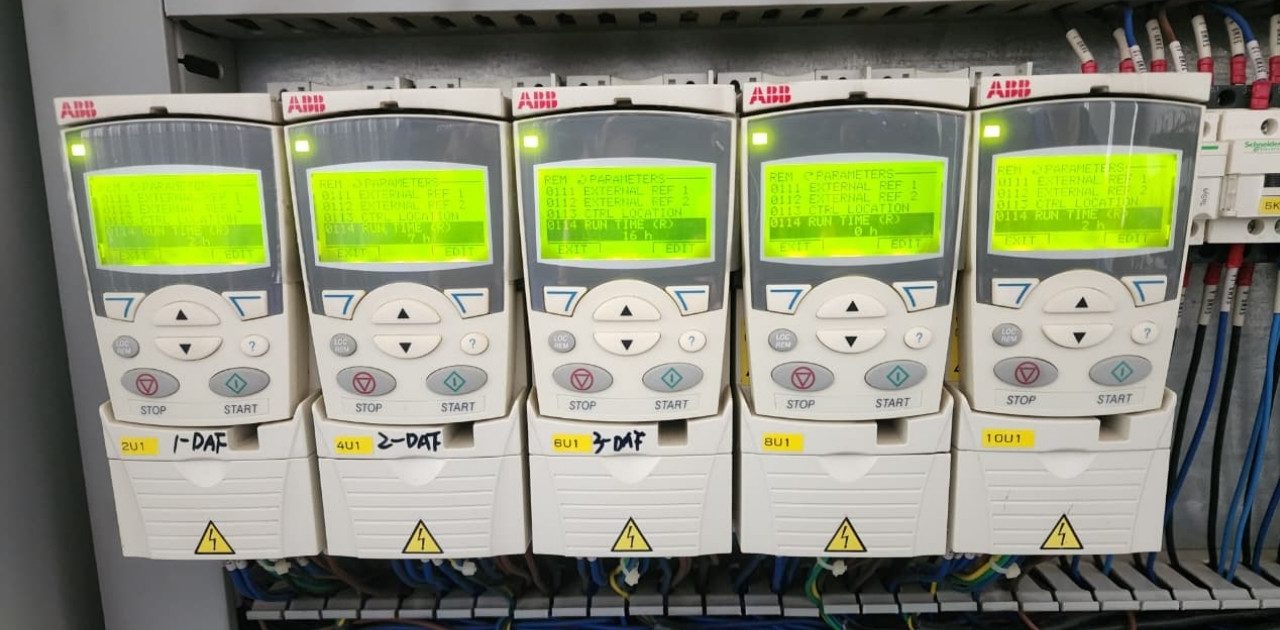
VFD failure is one of those problems that keeps plant engineers up at night because when a drive goes down the entire process stops with it. I have personally seen a single VFD failure on a critical cooling water pump shut down an entire production line for six hours costing the facility over $30,000 in lost output before anyone even got a replacement drive on site. Multiply that across the hundreds of VFDs installed in a typical industrial facility and you start to understand why this topic deserves serious attention.
Variable frequency drive failure does not always announce itself with a dramatic explosion or smoke. More often it starts as an intermittent fault code that someone resets and ignores, or a subtle change in motor performance that nobody investigates. By the time the drive actually locks out the damage is done and the repair bill includes not just the drive itself but lost production, emergency labor, expedited shipping on parts, and sometimes collateral damage to the motor or downstream equipment.
In this guide we break down the 7 most expensive VFD failure causes and give you proven prevention strategies every engineer should implement today. Whether you are maintaining drives in a water treatment plant, a manufacturing facility, or a commercial HVAC system, these lessons apply across the board.
Why VFD Failure Is More Common Than You Think
A well maintained VFD should last 7 to 15 years depending on operating conditions and component quality. But the reality in most plants is that drives rarely get the attention they need until something goes wrong. They sit inside panels collecting dust, running in ambient temperatures well above their ratings, connected with wiring that has loosened over years of thermal cycling and vibration.
The modern VFD is a sophisticated piece of power electronics. It contains electrolytic capacitors that dry out over time, IGBT modules that degrade with thermal stress, cooling fans with bearings that wear out, and control boards sensitive to moisture and contamination. Every one of these components has a finite life and every one of them is affected by the environment and electrical conditions you subject them to. When you combine poor installation practices with lack of maintenance and challenging operating environments, VFD faults become almost inevitable rather than exceptional.
Table of Contents
The 7 Costly Causes of VFD Failure
1. Overheating from Poor Environment and Blocked Cooling
This is the number one killer of VFDs and it is the most preventable. Every VFD generates heat internally from the switching losses in the IGBTs and current flowing through bus bars and connections. The drive relies on its cooling system to remove that heat and maintain junction temperatures within safe limits. When the cooling fails the internal temperatures climb and component life drops exponentially.
The general rule of thumb in electronics reliability is that for every 10 degree Celsius rise above rated temperature the component life is cut in half. So a drive rated for 40C ambient running in a 55C panel is losing life at an alarming rate.
Real world symptoms include random fault codes that clear on reset, drives that trip on hot afternoons but run fine at night, and visible dust buildup on heat sinks and fan guards.
Why it happens. Panels installed in direct sunlight or near process heat sources. Cooling fans that have failed or slowed down due to worn bearings. Air filters on panel doors that are clogged with dust, fibers, or oil mist. Drives mounted too close together without adequate spacing for airflow.
Cost impact. Premature IGBT failure alone can cost $2,000 to $8,000 per drive depending on frame size, plus production downtime.
Prevention checklist
- Verify ambient temperature inside the panel stays below the drive rating, use a simple min/max thermometer
- Inspect and replace cooling fans every 3 to 5 years or based on running hours
- Clean or replace panel air filters on a quarterly schedule minimum
- Maintain manufacturer recommended clearances above and below each drive for airflow
- Consider panel AC units or vortex coolers for high ambient installations
The power dissipated as heat inside a typical VFD can be estimated using:
Ploss = Prated × (1 − η)
Where ηη is the drive efficiency, typically 0.96 to 0.98. So a 100 HP drive at 97 percent efficiency still dumps about 2.2 kW of heat into the panel. That adds up fast when you have multiple drives in one enclosure.
2. Loose Connections and Terminal Issues
This is the silent killer. A connection that was properly torqued during installation can loosen over time due to thermal cycling. Every time the drive loads up the conductors heat and expand. When the load drops they cool and contract. Over thousands of cycles the terminal screws back off slightly and the contact resistance increases. Higher resistance means more heat which causes more expansion which loosens the connection further. It is a vicious cycle that ends with a burnt terminal, an arc flash event, or a dead drive.
Real world symptoms. Discolored or melted wire insulation at terminals. Intermittent overcurrent faults. Burning smell from inside the panel. Visible heat damage on bus bar connections.
Prevention checklist
- Retorque all power connections to manufacturer specifications at commissioning, after 3 months, and then annually
- Use calibrated torque wrenches not regular wrenches
- Perform annual thermal imaging scans on all VFD connections under load
- Use proper lug crimps and ensure correct wire gauge for the current
I cannot stress the thermal imaging point enough. A $500 thermal scan once a year can prevent a $50,000 failure. I have caught dozens of failing connections this way that looked perfectly fine to the naked eye but showed up as bright hot spots on the IR camera.
3. Overvoltage and Undervoltage Faults
VFDs continuously monitor their DC bus voltage and will trip if it goes outside the acceptable window. Overvoltage faults are extremely common and typically happen during motor deceleration when the motor regenerates energy back into the DC bus faster than the drive can handle it. The bus voltage spikes above the trip threshold and the drive shuts down to protect its capacitors and IGBTs.
Undervoltage faults occur when the incoming supply voltage sags or drops out momentarily. Even a half cycle voltage dip from a nearby large motor starting or a utility switching event can cause the DC bus to dip below the minimum threshold.
Prevention checklist
- Increase deceleration ramp times to reduce regenerative energy buildup
- Install dynamic braking resistors for applications requiring fast stops
- Add surge protection devices on the input to handle utility transients
- Consider ride through options or input capacitor banks for facilities with frequent voltage sags
| DC Bus Overvoltage | Fast decel or regen load | Increase decel time | Add braking resistor |
| DC Bus Undervoltage | Supply voltage sag | Check incoming power | Add ride through kit |
| Line Overvoltage | Utility surge or PF caps switching | Reset and monitor | Install SPD at input |
| Line Undervoltage | Weak supply or loaded transformer | Check tap settings | Upgrade transformer |
4. Overcurrent Faults and Motor Load Problems
When the drive output current exceeds its rated capacity it trips on overcurrent to protect the IGBT modules. This fault points to something demanding more current than expected which could be mechanical or electrical in nature.
Common causes include a seized or binding load, a shorted motor winding, a grounded cable, or simply a drive that is undersized for the application. I have also seen overcurrent trips caused by incorrect motor parameter setup where the drive thinks it is running a smaller motor and sets the current limit too low.
Prevention checklist
- Verify motor nameplate data is entered correctly in drive parameters during commissioning
- Megger the motor and cable insulation annually, minimum 100 megohms at 500V for low voltage motors
- Check mechanical load for bearing wear, coupling alignment, and any binding conditions
- Make sure the drive is sized for the actual load profile not just steady state FLA
5. Capacitor and IGBT Component Wear
The DC bus electrolytic capacitors are the life limiting components in most VFDs. Over time the electrolyte inside these capacitors dries out and their capacitance drops while their equivalent series resistance increases. This leads to higher ripple current on the bus, increased heating, and eventually capacitor failure which can take out the IGBTs as collateral damage.
IGBT modules themselves degrade through thermal cycling as the bond wires and solder connections inside the module fatigue over millions of heating and cooling cycles.
Typical capacitor life is 5 to 10 years depending on operating temperature and ripple current loading. Some manufacturers offer capacitor reformation services or replacement kits for aging drives.
Prevention checklist
- Track drive running hours and plan capacitor replacement at the manufacturer recommended interval
- Keep operating temperature low to extend capacitor life
- Monitor DC bus voltage ripple during annual checks as an indicator of capacitor health
- Budget for IGBT module replacement on critical drives after 8 to 10 years
6. Harmonics, EMI, and Power Quality Issues
VFDs are both victims and contributors when it comes to power quality. The rectifier front end generates harmonic currents that flow back into the supply system and can cause voltage distortion, transformer overheating, and interference with other equipment. At the same time VFDs are sensitive to incoming power quality problems like voltage unbalance, transient surges, and notching from other rectifier loads on the same bus.
EMI from the high frequency PWM switching can also interfere with nearby control systems, communication networks, and instrumentation if proper shielding and grounding practices are not followed.
The total harmonic current distortion from a standard 6 pulse VFD without any mitigation can exceed 80 percent of the fundamental current. The dominant harmonics follow the formula:
h=6k±1h=6k±1
Where k=1,2,3…k=1,2,3… giving you the 5th, 7th, 11th, 13th and so on.
Prevention checklist
- Install 3 to 5 percent input line reactors on every drive as standard practice
- Use shielded motor cables with proper 360 degree ground terminations
- Separate VFD power cables from signal cables by at least 300mm
- Perform a harmonic study before adding large VFD loads to an existing distribution system
7. Incorrect Sizing, Installation, or Long Motor Cable Runs
This last category covers the engineering and installation mistakes that set a drive up for failure from day one. Undersized drives run at or near their thermal limits continuously and have no margin for overloads. Oversized drives can have auto tuning problems and poor low speed performance. Long motor cables create reflected wave voltage spikes that stress both the drive output stage and the motor insulation.
I have seen installations where the motor was 200 meters from the drive with no output filter and the motor failed within 18 months from insulation breakdown. The reflected wave voltage at the motor terminals was measured at over 1,400 volts peak on a 480 volt system.
Prevention checklist
- Size the drive based on motor FLA and application duty, not just horsepower
- Keep motor cable length within manufacturer limits, typically under 100 meters without filters
- Install output reactors or dV/dt filters for cable runs over 50 meters
- Use sine wave filters for runs exceeding 200 to 300 meters
- Verify the motor is inverter duty rated per NEMA MG1 Part 31 for new installations
Proven Prevention Strategies Every Engineer Must Implement
Preventing VFD failure comes down to three pillars which are proper installation, correct sizing, and disciplined maintenance. If you get those three right your drives will consistently deliver their full design life and often exceed it.
Follow a preventive maintenance schedule aligned with NFPA 70B recommendations for electrical equipment. Here is a practical checklist organized by frequency.
| Monthly | Visual inspection for dust, damage, and warning indicators | Flashlight, eyes |
| Quarterly | Clean or replace panel air filters, check fan operation | Replacement filters |
| Semi Annual | Thermal scan all power connections under load | IR camera |
| Annually | Retorque all power terminals, megger motor and cables | Torque wrench, megger |
| Every 3 to 5 Years | Replace cooling fans, inspect capacitors for swelling | Replacement parts |
| Every 7 to 10 Years | Evaluate capacitor health, consider replacement | ESR meter or OEM service |
On top of maintenance, make sure every new VFD installation includes the right accessories from the start. Line reactors on the input, output reactors or filters where cable length demands it, surge protection devices at the incoming power terminals, and proper enclosure rating for the environment whether that is NEMA 12 for clean indoor areas or NEMA 4X for washdown environments.
Step by Step VFD Troubleshooting Flowchart
When a VFD faults follow a systematic approach rather than just resetting and hoping.
Step 1. Read and record the fault code from the display. Do not reset it before writing it down.
Step 2. Check the basics first. Verify incoming supply voltage on all three phases. Look for blown fuses or tripped breakers upstream.
Step 3. If the fault is overcurrent or ground fault, disconnect the motor leads at the drive output terminals and megger the motor and cable. If insulation is good the problem is likely in the drive or the load side mechanically.
Step 4. If the fault is overvoltage, check if it happened during deceleration. Review your ramp time settings and look at whether the load has high inertia.
Step 5. If the fault is overtemperature, check fan operation, panel temperature, and airflow obstructions immediately.
Step 6. For persistent or unclear faults, review the fault history log in the drive. Most modern drives store the last 10 to 20 faults with timestamps and operating conditions at the time of the trip. That data tells you a story if you take the time to read it.
Real World Case Studies
Case 1: Cement Plant Conveyor. A 200 HP VFD on a clinker conveyor was tripping on overcurrent every few weeks. Each trip cost about 2 hours of downtime. Investigation found that the motor parameters in the drive had never been updated after the original motor was replaced with a different frame size motor. The FLA setting was wrong and the current limit was set 15 percent below the actual motor rating. A 10 minute parameter correction fixed a problem that had been causing failures for over a year.
Case 2: HVAC Chiller Plant. Four 75 HP drives on chilled water pumps were failing capacitors every 3 to 4 years in a mechanical room that regularly hit 45C in summer. Adding a dedicated exhaust fan to the VFD panel section and upgrading the panel air filters extended the capacitor life to beyond 8 years with zero failures since.
Case 3: Water Treatment Facility. A VFD located 180 meters from the motor was causing repeated motor winding failures every 12 to 18 months. Installing a dV/dt output filter at the drive eliminated the reflected wave voltage spikes and the replacement motor has been running for over 4 years with no issues.
1. What is the most common cause of VFD failure?
Overheating is consistently the number one cause of VFD failure across every industry. It accelerates the aging of electrolytic capacitors, stresses IGBT junctions, and degrades solder connections inside power modules. Keeping the operating environment within the drive’s temperature rating and maintaining the cooling system is the single most impactful thing you can do to extend drive life.
2. Why do VFDs fail suddenly?
Most VFD failures that appear sudden actually had warning signs building up for weeks or months. A slowly loosening connection, a fan that gradually slowed down, or a capacitor that was losing capacitance over time. The failure seems sudden because nobody was monitoring those parameters. Regular maintenance and thermal scanning catch these developing issues before they become catastrophic.
3. How do you prevent VFD overheating?
Keep the ambient temperature inside the enclosure below the drive’s rating which is typically 40C or 104F. Replace cooling fans every 3 to 5 years. Clean panel air filters quarterly at minimum. Make sure there is adequate clearance above and below the drive for convection airflow. In high temperature environments consider panel cooling units.
4. Can loose connections cause VFD failure?
Absolutely. Loose connections are the second most common cause of VFD failure. A loose terminal creates high resistance which generates localized heat. That heat accelerates further loosening and can eventually lead to arcing, terminal meltdown, or fire. Annual retorquing and thermal imaging are the most effective prevention methods.
5. What causes VFD overcurrent faults?
Overcurrent faults can be caused by a shorted motor winding, a grounded cable, a mechanically jammed or overloaded machine, an undersized drive, or incorrect motor parameters programmed into the drive. Disconnect the motor and megger it first to rule out electrical issues, then examine the mechanical load.
6. How long do VFDs typically last?
With proper maintenance and favorable operating conditions a VFD should last 10 to 15 years. The electrolytic capacitors on the DC bus are usually the first components to reach end of life at around 7 to 10 years. Cooling fans typically need replacement every 3 to 5 years. In harsh environments without adequate maintenance, failures within 3 to 5 years are common.
7. Does poor power quality damage VFDs?
Yes. Voltage sags, surges, transients, and phase unbalance all stress VFD components. A voltage surge from a lightning event or capacitor bank switching can punch through diodes or IGBTs. Chronic voltage unbalance above 2 to 3 percent causes excessive current on one input phase and overheats the rectifier. Line reactors and surge protection devices provide good protection against most power quality issues.
8. How do harmonics affect VFDs?
VFDs generate harmonic currents that flow back into the power system and can cause voltage distortion, transformer overheating, and interference with other equipment. On the flip side, severe harmonic voltage distortion on the supply can cause increased heating and stress within the VFD itself. Input line reactors are the first line of defense and should be standard on every installation.
9. What is the best way to prevent VFD failure overall?
Follow three fundamental rules. First, install the drive correctly with proper sizing, cable lengths, and accessories from day one. Second, maintain the operating environment within the drive’s temperature and cleanliness ratings. Third, implement a preventive maintenance schedule that includes fan replacement, connection retorquing, thermal scanning, and motor insulation testing on a regular calendar.
10. Do VFDs need surge protection?
In most industrial and commercial installations yes. Voltage transients from lightning, utility switching, or power factor correction capacitor switching can damage the rectifier and DC bus components. A properly rated surge protection device installed at the drive input provides inexpensive insurance against these events.
Conclusion
VFD failure is not a matter of bad luck. It follows predictable patterns that experienced engineers recognize and prevent. The 7 costly causes we covered here, overheating, loose connections, overvoltage and undervoltage events, overcurrent faults, component aging, power quality issues, and installation mistakes, account for the vast majority of every drive failure you will ever encounter in the field.
The good news is that every single one of these causes has a straightforward and cost effective prevention strategy. Regular thermal imaging catches loose connections before they burn. Fan replacement and filter cleaning keep temperatures in check. Proper sizing and output filters protect against cable length issues. And a disciplined preventive maintenance schedule tied to NFPA 70B guidelines ties it all together.
Implement these 7 prevention steps today and you can realistically extend your VFD life by 5 or more years while dramatically reducing unplanned downtime. The cost of prevention is a fraction of the cost of failure, and the math is not even close.
